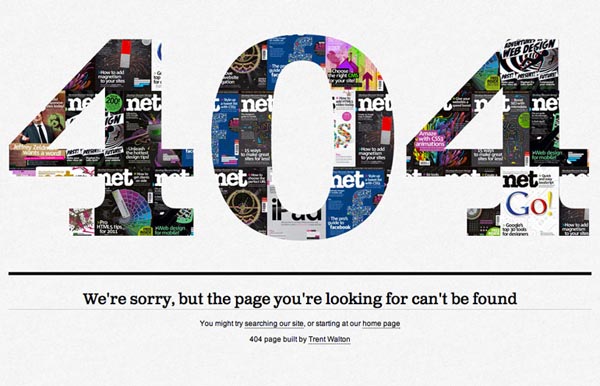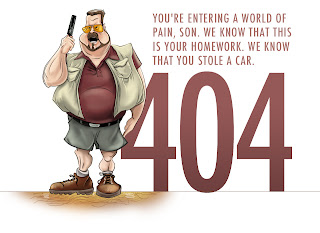
.

Showing posts with label css. Show all posts

Saturday, 26 January 2013

how to customize 404 page for blogger

Custom 404 pages for blogger
404, what the mean of 404 page not found its mean when user click on an invalid link or an expired link So your user will redirected to 404 error page. error pages have many type but in blogger the most common error page is 404 error page. Now a days you can see how many sites have their own beautiful 404 custom error pages. Today i will teach you that how to create an awesome 404 error page in blogger . it is not so hard but it is too easy to create a most beautiful page of your blog.

Importance to 404 page:

404 page is really important in blogs because if your user find and invalid link he think that this blog is full of expired links but if you have custom page then he think its just a typo mistake and he again reading your other posts.

creating a 404 error page in blogger:  

  • Goto blogger dashboard 
  • Then goto setting tab and click on search preferences 
  • then click custom page not found edit button
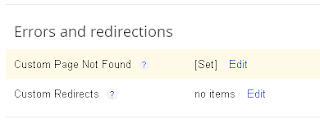
custom 404 page for blogger
  • Then paste below codes in it.
    404 page
    404 page
<style type="text/css" > body {background:white url('https://blogger.googleusercontent.com/img/b/R29vZ2xl/AVvXsEibIjmc7zQ5QcYu-ue0N0SuaYjQFYpjnYUXWn5cOC4mXk-sfK8R40UoNxkz8Q9EK9yR19JJX6gp8x969Kb_0hvf_ktsuTp3hP3FX6GwzppIl-rB3ItdR0k2rV_-j7wpHUl7vyqFNkSGZxE/s1600/404-not-found-page-24.jpg') 50% 0% no-repeat !important;z-index:10000000;} .sidebar, footer, .content, .header, .columns-inner, .footer-top {display:none;} body {min-width: 0px !important;} </style>

404 page
404 page
<style type="text/css" >
body {background:white url('https://blogger.googleusercontent.com/img/b/R29vZ2xl/AVvXsEgp0W2dFnW_07rRE10T9lJTFrh3FoI_J03xwekd9WXh1nN72KvesYikZWgueB2HkzTMU_Uzahj2CEEHwCQV74PgELr5xkM0lfCzTI7XTXFxrtNLcQhjUrumwhRK3L8DaedwNom3EL5qSUw/s640/404_6.jpg')  50% 0% no-repeat !important;z-index:10000000;}
.sidebar, footer, .content, .header, .columns-inner, .footer-top {display:none;}
body {min-width: 0px !important;}
</style>
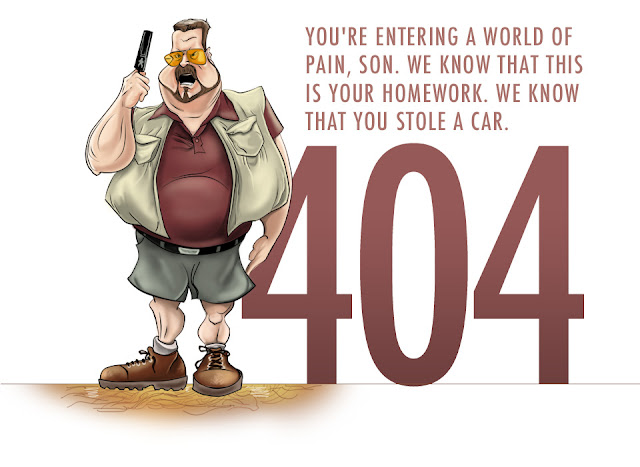
  • Now save it and its done
Hope you like my post about customize 404 page please share it with your friends and keep visiting here to find new and awesome widgets
Read More


Friday, 25 January 2013

beautiful numbered page navigation for blogger blog


I recently Posted about characters and count tools for blogger  which my readers really like but some of them ask me about blogger widgets. Some ask me about seo and blogger templates but i decide to post about blogger widgets. Blogger widgets are playing an important role in designing of blogs . Making blog beautiful is a simple wish which nowadays every blogger had. But you are thinking that which one widget i,m going to share now, it is beautiful number page navigation for blogger which makes your blog very beautiful . you can watch live demo in below picture

beautiful numbered page navigation for blogger
you can also add this beautiful widget in blog this widget is really awesome and beautiful . page navigation is one of the most important part of blogger blog because your readers can engaged with your blog and it make ease to locate following posts which they are searching for . You can add this navigation bar really easy but its coding is pretty long so do not bored please and follow my steps to create this navigation bar :)

Installation:


  • Goto blogger dashboard
  • now goto  template tab and edit html
  • and click expands widget templates
  • now find ]]></b:skin> and paste below css just above  ]]></b:skin> tag.
.pagenavi{ position: relative; display: block; width: 400px; height: 40px; overflow: visible; margin: 50px auto; border: 10px solid rgba(255,255,255,0.5); /*border-radius*/ -webkit-border-radius: 40px; -moz-border-radius: 40px; border-radius: 40px; /*box-shadow*/ -webkit-box-shadow: inset 0 0 10px #fff,0 1px 0 #666,0 -1px 0 #fff; -moz-box-shadow: inset 0 0 10px #fff,0 1px 0 #666,0 -1px 0 #fff; box-shadow: inset 0 0 10px #fff,0 1px 0 #666,0 -1px 0 #fff; } .pagenavi span,.pagenavi a{ font: bold 20px/30px Tahoma, Arial; cursor: pointer; text-decoration: none; color: #464646; display: block; float: left; margin-left: 2px; /*box-shadow*/ -webkit-box-shadow: inset rgba(0,0,0,0.1) 0 1px 0, inset rgba(255,255,255,0.7) 0 2px 0, inset rgba(255,255,255,0.7) 0 -1px 0, inset rgba(255,255,255,0.7) 1px 0 0, inset rgba(255,255,255,0.7) -1px 0 0, rgba(0,0,0,0.3) 0 3px 0; -moz-box-shadow: inset rgba(0,0,0,0.1) 0 1px 0, inset rgba(255,255,255,0.7) 0 2px 0, inset rgba(255,255,255,0.7) 0 -1px 0, inset rgba(255,255,255,0.7) 1px 0 0, inset rgba(255,255,255,0.7) -1px 0 0, rgba(0,0,0,0.3) 0 3px 0; box-shadow: inset rgba(0,0,0,0.1) 0 1px 0, inset rgba(255,255,255,0.7) 0 2px 0, inset rgba(255,255,255,0.7) 0 -1px 0, inset rgba(255,255,255,0.7) 1px 0 0, inset rgba(255,255,255,0.7) -1px 0 0, rgba(0,0,0,0.3) 0 3px 0; padding: 2px 10px; min-width: 10px; text-align: center; position: relative; text-shadow: #fff 0 1px 0; background: #cdcdcd; background: -webkit-gradient(linear, 0% 0%, 0% 100%, from(rgba(255,255,255,0.8)), to(rgba(200,200,200,0.9))); /*linear-gradient*/ background: -webkit-gradient(linear,left top,left bottom,from(rgba(255,255,255,0.8)),to(rgba(200,200,200,0.9))); background: -webkit-linear-gradient(top, rgba(255,255,255,0.8), rgba(200,200,200,0.9)); background: -moz-linear-gradient(top, rgba(255,255,255,0.8), rgba(200,200,200,0.9)); background: -o-linear-gradient(top, rgba(255,255,255,0.8), rgba(200,200,200,0.9)); background: linear-gradient(top, rgba(255,255,255,0.8), rgba(200,200,200,0.9)); } .pagenavi a:after { content: ''; position: absolute; bottom: -3px; height: 100%; display: block; width: 100%; left: 0; /*box-shadow*/ -webkit-box-shadow: inset rgba(255,255,255,0.2) 1px 0 0, inset rgba(255,255,255,0.2) -1px 0 0, rgba(0,0,0,0.4) 0 1px 0; -moz-box-shadow: inset rgba(255,255,255,0.2) 1px 0 0, inset rgba(255,255,255,0.2) -1px 0 0, rgba(0,0,0,0.4) 0 1px 0; box-shadow: inset rgba(255,255,255,0.2) 1px 0 0, inset rgba(255,255,255,0.2) -1px 0 0, rgba(0,0,0,0.4) 0 1px 0; } .pagenavi a:first-child::after { /*border-radius*/ -webkit-border-radius: 500px 0 0 500px; -moz-border-radius: 500px 0 0 500px; border-radius: 500px 0 0 500px; } .pagenavi a:last-child::after { /*border-radius*/ -webkit-border-radius: 0 50px 50px 0; -moz-border-radius: 0 50px 50px 0; border-radius: 0 50px 50px 0; } .pagenavi a.current:after { height: 1px; bottom: -1px; } .pagenavi a:before { content: ''; position: absolute; top: 1px; height: 100%; /*box-shadow*/ -webkit-box-shadow: rgba(0,0,0,0.4) 0 3px 0; -moz-box-shadow: rgba(0,0,0,0.4) 0 3px 0; box-shadow: rgba(0,0,0,0.4) 0 3px 0; width: 1px; display: block; background: rgba(0,0,0,0.4); right: -1px; } .pagenavi a:last-child::before { display: none !important } .pagenavi a:first-child { /*border-radius*/ -webkit-border-radius: 50px 0 0 50px; -moz-border-radius: 50px 0 0 50px; border-radius: 50px 0 0 50px; font-family: 'WebSymbolsRegular'; } .pagenavi a:last-child { /*border-radius*/ -webkit-border-radius: 0 50px 50px 0; -moz-border-radius: 0 50px 50px 0; border-radius: 0 50px 50px 0; font-family: 'WebSymbolsRegular'; } .pagenavi a:hover { /*box-shadow*/ -webkit-box-shadow: inset rgba(0,0,0,0.1) 0 1px 0, inset rgba(255,255,255,0.7) 0 2px 0, inset rgba(255,255,255,0.7) 0 -1px 0, inset rgba(255,255,255,0.7) 1px 0 0, inset rgba(255,255,255,0.7) -1px 0 0, inset rgba(255,255,255,1) 0 0 15px, rgba(0,0,0,0.2) 0 3px 0; -moz-box-shadow: inset rgba(0,0,0,0.1) 0 1px 0, inset rgba(255,255,255,0.7) 0 2px 0, inset rgba(255,255,255,0.7) 0 -1px 0, inset rgba(255,255,255,0.7) 1px 0 0, inset rgba(255,255,255,0.7) -1px 0 0, inset rgba(255,255,255,1) 0 0 15px, rgba(0,0,0,0.2) 0 3px 0; box-shadow: inset rgba(0,0,0,0.1) 0 1px 0, inset rgba(255,255,255,0.7) 0 2px 0, inset rgba(255,255,255,0.7) 0 -1px 0, inset rgba(255,255,255,0.7) 1px 0 0, inset rgba(255,255,255,0.7) -1px 0 0, inset rgba(255,255,255,1) 0 0 15px, rgba(0,0,0,0.2) 0 3px 0; } .pagenavi a:active { /*box-shadow*/ -webkit-box-shadow: inset rgba(0,0,0,0.1) 0 1px 0, inset rgba(0,0,0,0.2) 1px 0 0px, inset rgba(0,0,0,0.2) -1px 0 0px, inset rgba(255,255,255,0.7) 0 2px 0, inset rgba(255,255,255,0.7) 0 -1px 0, inset rgba(0,0,0,0.1) 0 0 15px, rgba(0,0,0,0.2) 0 2px 0; -moz-box-shadow: inset rgba(0,0,0,0.1) 0 1px 0, inset rgba(0,0,0,0.2) 1px 0 0px, inset rgba(0,0,0,0.2) -1px 0 0px, inset rgba(255,255,255,0.7) 0 2px 0, inset rgba(255,255,255,0.7) 0 -1px 0, inset rgba(0,0,0,0.1) 0 0 15px, rgba(0,0,0,0.2) 0 2px 0; box-shadow: inset rgba(0,0,0,0.1) 0 1px 0, inset rgba(0,0,0,0.2) 1px 0 0px, inset rgba(0,0,0,0.2) -1px 0 0px, inset rgba(255,255,255,0.7) 0 2px 0, inset rgba(255,255,255,0.7) 0 -1px 0, inset rgba(0,0,0,0.1) 0 0 15px, rgba(0,0,0,0.2) 0 2px 0; top: 1px; text-shadow: #fff 0 0 15px; } .pagenavi a:active:after { bottom: -2px } .pagenavi a:active:before { /*box-shadow*/ -webkit-box-shadow: rgba(0,0,0,0.4) 0 3px 0; -moz-box-shadow: rgba(0,0,0,0.4) 0 3px 0; box-shadow: rgba(0,0,0,0.4) 0 3px 0; top: 0px; } .pagenavi a.current { /*box-shadow*/ -webkit-box-shadow: inset rgba(0,0,0,0.1) 0 1px 0, inset rgba(0,0,0,0.3) 1px 0 0px, inset rgba(0,0,0,0.3) -1px 0 0px, inset rgba(255,255,255,0.7) 0 2px 0, inset rgba(255,255,255,0.7) 0 -1px 0, inset rgba(0,0,0,0.1) 0 0 15px, rgba(0,0,0,0.3) 0 1px 0; -moz-box-shadow: inset rgba(0,0,0,0.1) 0 1px 0, inset rgba(0,0,0,0.3) 1px 0 0px, inset rgba(0,0,0,0.3) -1px 0 0px, inset rgba(255,255,255,0.7) 0 2px 0, inset rgba(255,255,255,0.7) 0 -1px 0, inset rgba(0,0,0,0.1) 0 0 15px, rgba(0,0,0,0.3) 0 1px 0; box-shadow: inset rgba(0,0,0,0.1) 0 1px 0, inset rgba(0,0,0,0.3) 1px 0 0px, inset rgba(0,0,0,0.3) -1px 0 0px, inset rgba(255,255,255,0.7) 0 2px 0, inset rgba(255,255,255,0.7) 0 -1px 0, inset rgba(0,0,0,0.1) 0 0 15px, rgba(0,0,0,0.3) 0 1px 0; top: 2px; text-shadow: #fff 0 0 15px; } .pagenavi a.current:before { /*box-shadow*/ -webkit-box-shadow: rgba(0,0,0,0.4) 0 3px 0; -moz-box-shadow: rgba(0,0,0,0.4) 0 3px 0; box-shadow: rgba(0,0,0,0.4) 0 3px 0; top: -1px; } .pagenavi a.current:active:after { bottom: -1px }
  • now find <b:widget id='Blog1' locked='true' title='Blog Posts' type='Blog'>
  • and paste below code just below the above tag
<b:includable id='page-navi'> <div class="pagenavi"> <script type="text/javascript"> var pageNaviConf = { perPage: 5, numPages: 6, firstText: "First", lastText: "Last", nextText: &quot;&#187;&quot;, prevText: &quot;&#171;&quot; } </script> <script type="text/javascript" src="http://rilwis.googlecode.com/svn/trunk/blogger/pagenavi.min.js"></script> <div class="clear" /> </div> </b:includable>
  • Now here's the final step find  
<!– navigation –>
<b:include name='nextprev'/>

  • And replace them with below code
<b:if cond='data:blog.pageType == "index"'>
<b:include name='page-navi' />
<b:else/>
<b:if cond='data:blog.pageType == "archive"'>
<b:include name='page-navi' />
</b:if>
</b:if>

  • Now save the template and its done
This widget is pretty cool but coding is pretty long also but it really make your blog beautiful i hope you like my post please share this with your friends and keep visiting to find more awesome widgets.

Read More


Saturday, 12 January 2013

fast loading css social widget for blogger

fast Css social widget
fast Css social widget 
hi every one you know social networking is a great way to gain traffic for your blog and and it increase you SEO and you get 1000 of backlinks for your blog. Today i,m going to tell you that how to add beautiful and fast loading css social widget . it is user friendly and it is compatible with major browsers i,m writting about its compatibility in next paragraph

Browsers compatibility:

browsers compatibility  is a main issues of new widgets but this widget work with these browsers
  • Google chrome 14 and 14+
  • firefox 4 and +
  • safari 4 and +
  • opera 10 and +
  • I.E 8 and +
you can also watch live demo of our social widget and then you can easily take decision of adding it .

Installation 

1. Goto your blogger account > Dashboard
2. Now click on Expand template widget check box
3. Now find <div class=’post-footer-line post-footer-line-1'> tag
4. And then paste below code just below the <div class=’post-footer-line post-footer-line-1'> 


<style type="text/css">
.container {
  margin: 0px auto;
  width: 300px;
  text-align: center;
}

.share-btn {
  display: inline-block;
  vertical-align: top;
  position: relative;
  margin: 0 5px;
  padding-top: 40px;
  width: 75px;
  font-weight: bold;
  text-align: center;
  text-decoration: none;
  border-radius: 8px;
  -webkit-box-shadow: 0 2px 2px rgba(0, 0, 0, 0.2);
  box-shadow: 0 2px 2px rgba(0, 0, 0, 0.2);
}

.share-btn:active {
  margin-top: 3px;
}

.share-btn:active .share-btn-action {
  padding-bottom: 3px;
  -webkit-box-shadow: inset 0 -3px rgba(0, 0, 0, 0.15), inset 0 -1px rgba(0, 0, 0, 0.15);
  box-shadow: inset 0 -3px rgba(0, 0, 0, 0.15), inset 0 -1px rgba(0, 0, 0, 0.15);
}

.share-btn:active .share-btn-action:after {
  bottom: 3px;
}

.share-btn-count {
  position: absolute;
  top: 0;
  left: 0;
  right: 0;
  line-height: 40px;
  font-size: 19px;
  letter-spacing: -1px;
  color: #555;
  text-shadow: 0 1px white;
  background: #e6eff5;
  border-width: 1px 1px 0;
  border-style: solid;
  border-color: #c5c5c5 #bbb;
  border-radius: 8px 8px 0 0;
  background-image: -webkit-linear-gradient(top, rgba(0, 0, 0, 0.03) 0%, transparent 40%);
  background-image: -moz-linear-gradient(top, rgba(0, 0, 0, 0.03) 0%, transparent 40%);
  background-image: -o-linear-gradient(top, rgba(0, 0, 0, 0.03) 0%, transparent 40%);
  background-image: linear-gradient(to bottom, rgba(0, 0, 0, 0.03) 0%, transparent 40%);
  -webkit-box-shadow: inset 0 1px rgba(255, 255, 255, 0.5), 0 1px rgba(0, 0, 0, 0.18), 0 2px rgba(0, 0, 0, 0.07);
  box-shadow: inset 0 1px rgba(255, 255, 255, 0.5), 0 1px rgba(0, 0, 0, 0.18), 0 2px rgba(0, 0, 0, 0.07);
}

.share-btn-count:before, .share-btn-count:after {
  content: '';
  position: absolute;
  top: 100%;
  left: 50%;
  margin-left: -6px;
  border: 6px solid transparent;
  border-top-color: #e6eff5;
}


.share-btn-count:before {
  margin-left: -7px;
  margin-top: 1px;
  border-width: 7px;
  border-top-color: rgba(0, 0, 0, 0.07);
}


.share-btn-action {
  display: block;
  position: relative;
  line-height: 32px;
  padding: 2px 0 6px;
  font-size: 14px;
  color: white;
  text-shadow: 0 1px 1px rgba(0, 0, 0, 0.4);
  border: solid rgba(0, 0, 0, 0.18);
  border-width: 0 1px;
  border-radius: 0 0 8px 8px;
}


.share-btn-action:after {
  content: '';
  position: absolute;
  top: 0;
  bottom: 6px;
  left: 0;
  right: 0;
  border-radius: 0 0 6px 6px;
  -webkit-box-shadow: inset 0 -1px 2px rgba(255, 255, 255, 0.25);
  box-shadow: inset 0 -1px 2px rgba(255, 255, 255, 0.25);
}


.share-btn-tweet {
  background: #83cfe8;
  background-image: -webkit-linear-gradient(top, #83cfe8, #6ebbd4);
  background-image: -moz-linear-gradient(top, #83cfe8, #6ebbd4);
  background-image: -o-linear-gradient(top, #83cfe8, #6ebbd4);
  background-image: linear-gradient(to bottom, #83cfe8, #6ebbd4);
  -webkit-box-shadow: inset 0 -6px rgba(0, 0, 0, 0.16), inset 0 -1px rgba(0, 0, 0, 0.15);
  box-shadow: inset 0 -6px rgba(0, 0, 0, 0.16), inset 0 -1px rgba(0, 0, 0, 0.15);
}


.share-btn-tweet:after {
  -webkit-box-shadow: inset 0 -1px 2px rgba(255, 255, 255, 0.5);
  box-shadow: inset 0 -1px 2px rgba(255, 255, 255, 0.5);
}


.share-btn-tweet + .share-btn-count {
  -webkit-box-shadow: inset 0 1px rgba(255, 255, 255, 0.5), 0 1px rgba(0, 0, 0, 0.12), 0 2px rgba(0, 0, 0, 0.04);
  box-shadow: inset 0 1px rgba(255, 255, 255, 0.5), 0 1px rgba(0, 0, 0, 0.12), 0 2px rgba(0, 0, 0, 0.04);
}


.share-btn-like {
  background: #6480bd;
  background-image: -webkit-linear-gradient(top, #6480bd, #3c5894);
  background-image: -moz-linear-gradient(top, #6480bd, #3c5894);
  background-image: -o-linear-gradient(top, #6480bd, #3c5894);
  background-image: linear-gradient(to bottom, #6480bd, #3c5894);
  -webkit-box-shadow: inset 0 -6px rgba(0, 0, 0, 0.15), inset 0 -1px rgba(0, 0, 0, 0.2);
  box-shadow: inset 0 -6px rgba(0, 0, 0, 0.15), inset 0 -1px rgba(0, 0, 0, 0.2);
}


.share-btn-plus {
  background: #626262;
  background-image: -webkit-linear-gradient(top, #626262, #404040);
  background-image: -moz-linear-gradient(top, #626262, #404040);
  background-image: -o-linear-gradient(top, #626262, #404040);
  background-image: linear-gradient(to bottom, #626262, #404040);
  -webkit-box-shadow: inset 0 -6px rgba(0, 0, 0, 0.08), inset 0 -1px rgba(0, 0, 0, 0.3);
  box-shadow: inset 0 -6px rgba(0, 0, 0, 0.08), inset 0 -1px rgba(0, 0, 0, 0.3);
}

</style>

<div class="container">
     <a href='https://twitter.com/TechnologyTweak' rel='nofollow' target='_blank' title='Find us on twitter' class='share-btn'>
      <span class="share-btn-action share-btn-tweet">twitter</span>
      <span class="share-btn-count">400+</span>
    </a>

    <a href='https://www.facebook.com/Technononimous' rel='nofollow' target='_blank' title='Find us on facebook' class='share-btn'>
      <span class="share-btn-action share-btn-like">facebook</span>
      <span class="share-btn-count">500+</span>
    </a>

    <a href="https://plus.google.com/115574597696558279166" class="share-btn" target="_blank" rel="author" title='Find us on google+'>
      <span class="share-btn-action share-btn-plus">google+</span>
      <span class="share-btn-count">200+</span>
    </a>
</div>
5. now replace the links with your links
6. Now save it and its done
Note if you like my post then please share it with friends
Read More


Tuesday, 25 December 2012

ad effects like spiceupyourblog for blogger

Hello readers, today i,m going to tell you about css ads effects like spiceupyourblog . Today i,m surfing on internet to find widgets and gadgets for my blog and i found very cool css effects for blogger these effects are  mostly using for buysellads.com ads . You can also get this widget for your blog and you can also see demo of these ads effects in my sidebar ads and also in my header ads. this is very fast and superloading effect and it does not have any effect on blogs loading time so you can easily and with any tension add it to your blog.
to use these effects follow my steps 

Steps to add effects

  • goto your blogger dashboard > edit html> click proceed
  • Now find ]]></b:skin> 
  • and paste below code just above the ]]></b:skin>
/* -------------------Ads------------------*/
div.bsap_125 a{width:125px;display:block;font-size:11px;color:#888;font-family:verdana,sans-serif;text-align:center;text-decoration:none;overflow:hidden;float:left;line-height:100%;margin:0 4px 10px 0;}
div.bsap_125 img{border:2px solid #ddd;clear:right;padding:5px;}
div.bsap_125 a.adhere{color:#666;font-weight:bold;font-size:12px;border:2px solid #ccc;background:#e7e7e7;text-align:center;width:125px;height:125px;line-height:1000%;}
div.bsap_125 a.adhere:hover{border:2px solid #999;background:#ddd;color:#333;}
html>

body div.bsap_125 a.adhere{width:123px;height:123px;}
div.bsap_468 a{width:468px;display:block;font-size:11px;color:#888;font-family:verdana,sans-serif;text-align:center;text-decoration:none;overflow:hidden;line-height:100%;margin:0;}
div.bsap_468 img{border:0;clear:right;}
div.bsap_468 a.adhere{color:#666;font-weight:bold;font-size:12px;border:1px solid #ccc;background:#e7e7e7;text-align:center;width:468px;height:60px;line-height:480%;}
div.bsap_468 a.adhere:hover{border:1px solid #999;background:#ddd;color:#333;}
html>

body div.bsap_728 a.adhere{width:726px;height:90px;}
div.bsap_728 a{width:468px;display:block;font-size:11px;color:#888;font-family:verdana,sans-serif;text-align:center;text-decoration:none;overflow:hidden;line-height:100%;margin:0;}
div.bsap_728 img{border:0;clear:right;}
div.bsap_728 a.adhere{color:#666;font-weight:bold;font-size:12px;border:1px solid #ccc;background:#e7e7e7;text-align:center;width:128px;height:90px;line-height:730%;}
div.bsap_728 a.adhere:hover{border:1px solid #999;background:#ddd;color:#333;}
html>

body div.bsap_336 a.adhere{width:334px;height:280px;}
div.bsap_336 a{width:468px;display:block;font-size:11px;color:#888;font-family:verdana,sans-serif;text-align:center;text-decoration:none;overflow:hidden;line-height:100%;margin:0;}
div.bsap_336 img{border:0;clear:right;}
div.bsap_336 a.adhere{color:#666;font-weight:bold;font-size:12px;border:1px solid #ccc;background:#e7e7e7;text-align:center;width:336px;height:280px;line-height:2200%;}
div.bsap_336 a.adhere:hover{border:1px solid #999;background:#ddd;color:#333;}
html>

body div.bsap_468 a.adhere{width:466px;height:58px;}
.bsap a{text-shadow:1px 1px 1px #111!important;color:#eee!important;overflow:visible!important;-webkit-transition:all .2s ease;-moz-transition:all .2s ease;-o-transition:all .2s ease;border:0 none!important;-webkit-border-top-left-radius:80px;-webkit-border-bottom-right-radius:80px;-moz-border-radius-topleft:80px;-moz-border-radius-bottomright:80px;border-top-left-radius:80px;border-bottom-right-radius:80px;margin:0 10px 10px 0 !important;padding:7px!important;}
.bsap a:hover{-webkit-border-top-left-radius:40px;-webkit-border-bottom-right-radius:40px;-moz-border-radius-topleft:40px;-moz-border-radius-bottomright:40px;border-top-left-radius:40px;border-bottom-right-radius:40px;}
.bsap a img{border:0 none!important;-webkit-box-shadow:0 0 8px rgba(0,0,0,0.5);-moz-box-shadow:0 0 8px rgba(0,0,0,0.5);box-shadow:0 0 8px rgba(0,0,0,0.5);padding:3px!important;}
.bsap .even{margin-right:0!important;}
.bsap .ad1{background:#e42b2b!important;}
.bsap .ad2{background:#ff8400!important;}
.bsap .ad3{background:#a800ff!important;}
.bsap .ad4{background:#49a7f3!important;}
.bsap .ad5{background:#41d05f!important;}
.bsap .ad6{background:#B24700!important;}
.bsap .ad7{background:#FFE500!important;}
.bsap .ad8{background:#007D47!important;}
.bsap .ad9{background:#330000!important;}
.bsap .ad10{background:#990000!important;}
.bsap .ad11{background:#f70000!important;}
  • Now save the template
  • now add a html/javascript gadget for ad
  • and copy the below code and paste it in html tab 

For 125x125 ads

<center>
<div id="bsap_125" class="bsap_125 bsap">
<a href="http://AddURL" class="ad1" title="Ad Title" id="bsa_1451626" target="_blank"> <img src = "http://Imageurl "alt ="AdName"height =" 125 "width =" 125 "/> </ a>
<a href="http://AdURL" class="ad2 even" title="Ad Title" target="_blank"> <img src = "http://AdURL"alt =" AdName "height =" 125 "width =" 125 "/> </ a>
<a href="http://AdURL" class="ad3" title="AdTitle" target="_blank"> <img src = "http://Ad Image URL"alt =" AdName "height =" 125 "width =" 125 "/> </ a>
<a href="http://AdURL" class="ad2 even" title="Ad Title" target="_blank"> <img src = "http://AdURL"alt =" AdName "height =" 125 "width =" 125 "/> </ a>
</ Div>
</ Center>

For 468x60 ads


<div id="bsap_468" class="bsap_468 bsap">
<span class="bsap_468 bsap"> <a href="AdURL" title="Advertise Here" class="adhere ad4" target="_blank"> Advertise Here </ a> </ span>
</ Div>

For 768x60

<div id="bsap_728" class="bsap_728 bsap">
<span class="bsap_728 bsap"> <a href="ADURL" title="Advertise Here" class="adhere ad1" target="_blank"> Advertise Here </ a> </ span>
</ Div>

For 336x280

<div id="bsap_728" class="bsap_728 bsap">
<span class="bsap_728 bsap"> <a href="ADURL" title="Advertise Here" class="adhere ad1" target="_blank"> Advertise Here </ a> </ span>
</ Div>
Note: you can change Ad image url with your image url and change ad url with your advertise url.
thank you very much if you like my post please share it with friends
Read More


© Copyright 2012, Template style of Haseeb malik - Design by Haseeb malik.